🎉 Limited-Time Sale: Get 40% OFF
New

🎬 Gemini Omni 1.1 is live — August 27, 2026

Gemini Omni 1.1Gemini Omni 1.1 — Longer Scenes, Precise Camera Control, 4K Output

Extend a shot to 40 seconds, lock the first and last frame, preview in fast draft mode, and deliver in 1080p or 4K. Gemini Omni 1.1 turns a single generation into a finished, production-ready scene.

Gemini Omni AI Video Generator

Video Generator

Gemini Omni 1.1 AI Video Generator

Generate videos using cutting-edge AI models

Gemini Omni 1.1Google Gemini Omni 1.1
Landscape
Portrait
360P
720P
1080P
4K

Note: 1080P videos take longer to generate

0/5000

✨ Please login to try for FREE ✨

What Gemini Omni 1.1 Can Do

Six capabilities that take Gemini Omni from short clips to complete, controllable, high-resolution scenes — all inside one unified omni-model.

40-Second Scene Extension

Continue any shot in 10-second steps up to 40 seconds. Gemini Omni 1.1 reads up to 10 seconds of prior footage before generating the next segment, so characters, motion and scene direction stay consistent throughout.

First & Last Frame Control

Set the opening and closing frame and let the model render one continuous, uncut shot between them — ideal for orbits, reveals, push-ins and any camera move that needs to land exactly where you planned it to.

360p Draft Mode

Preview ideas in a lightweight 360p draft that renders up to 60% faster and costs less than a full render. Iterate on prompts and timing quickly, then commit to a full-resolution render only when the shot feels right.

1080p & 4K Output

Upscale finished scenes to crisp 1080p or 4K for final delivery. Publish to YouTube, broadcast or client work straight from the model, with no external upscaling pass and no extra tools in the pipeline.

Video References

Include up to three seconds of reference video alongside text, images and audio. Gemini Omni 1.1 carries the visual context — motion, framing, style and mood — from your footage into the new generation.

Any-to-Any Multimodal

Combine text, image, audio and video in a single prompt and get synchronized video with audio back in one pass. Then refine the result conversationally, shot by shot, without ever starting over from scratch.

Workflow

From Draft to 4K in Three Steps

Gemini Omni 1.1 is built for iteration: sketch fast, control the shot, then deliver at full quality.

1

Draft the Shot

Write your prompt, attach images, audio or a short video reference, and render a 360p draft to check composition and timing in seconds.

2

Control the Camera

Pin the first and last frame to define the camera move, then extend the scene in 10-second steps up to 40 seconds while the model keeps continuity.

3

Deliver in 4K

Happy with the draft? Render the final scene at 1080p or 4K with synchronized audio, ready to download and publish.

Gemini Omni 1.1 in Action

Real input → prompt → output examples generated with Gemini Omni 1.1.

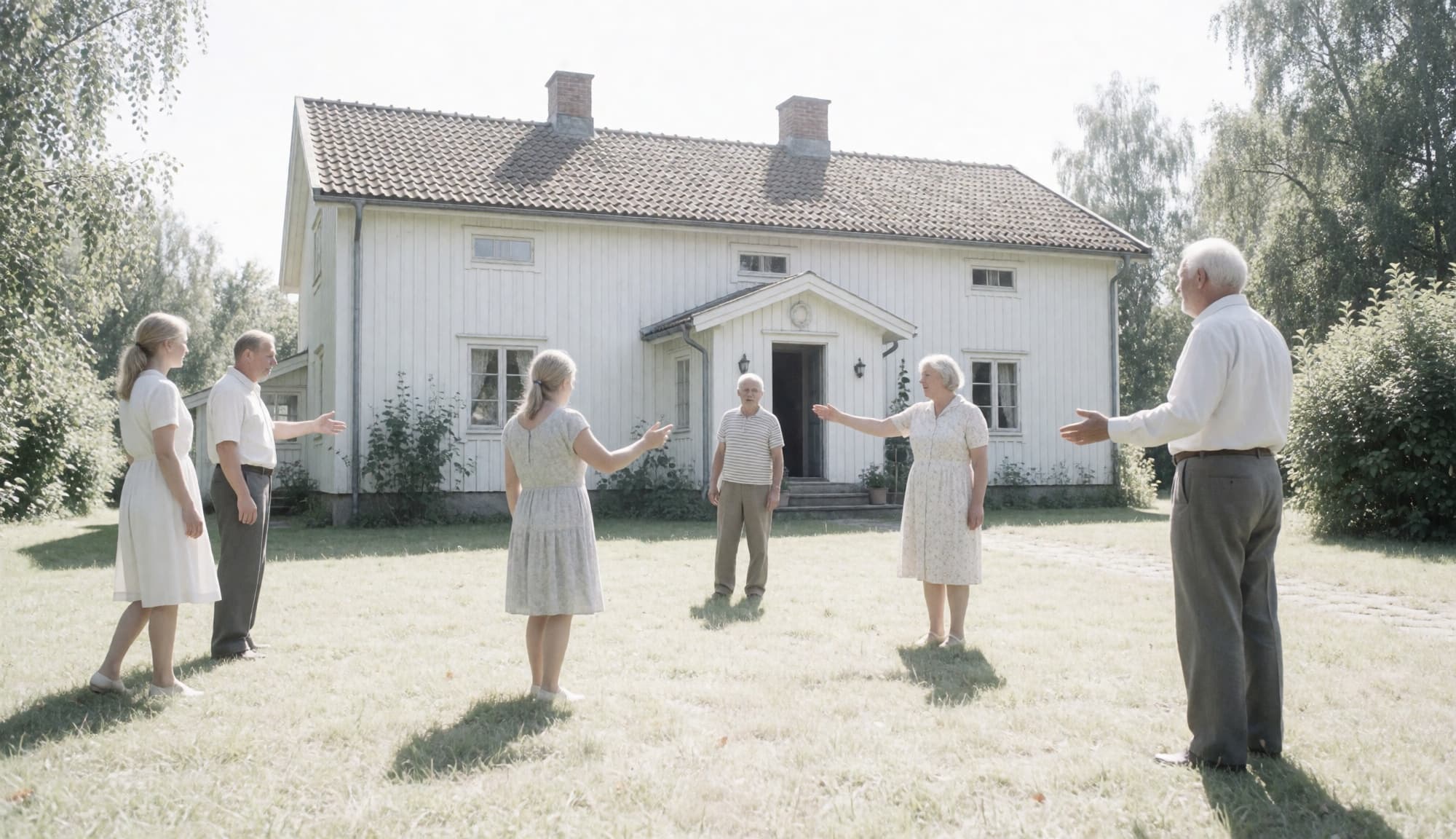
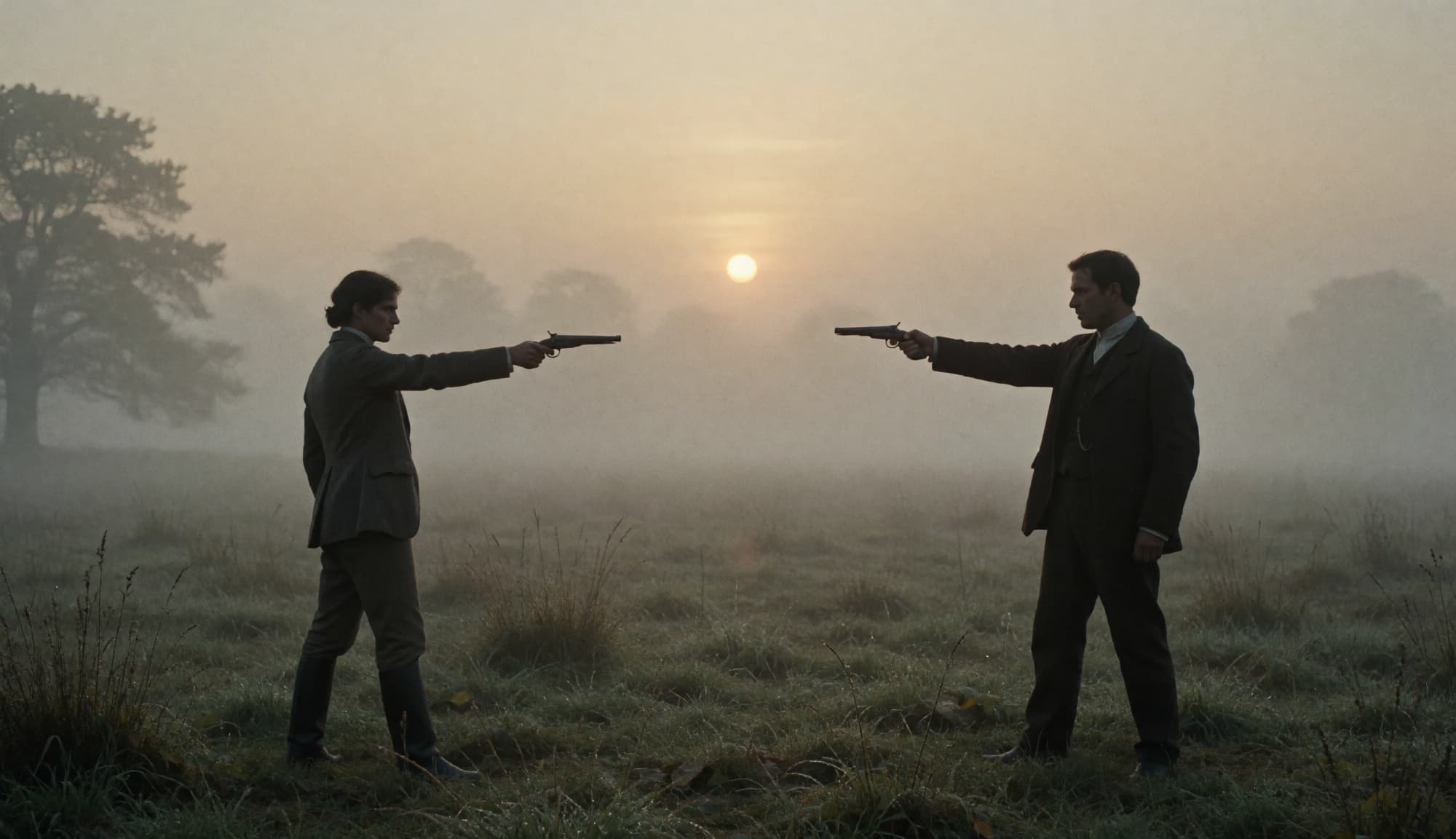
01Image References to Cinematic Scene

Two reference stills — a foggy duel and a farmhouse gathering — set the cast, wardrobe and light. Gemini Omni 1.1 builds a continuous 10-second scene from them with one line of direction.

Input imageReference image: two figures facing off in a misty field at sunrise
Input imageReference image: a family gathered in front of a white farmhouse
Prompt

Create a cinematic movie where it is about life or death.

Output

02Edit a Video with One Sentence

An oil-painting-style clip goes in, a single instruction swaps the object, and the shot comes back with the same brushwork, lighting and motion intact.

Input video
Prompt

Replace the bottle with an apple on this oil painting video.

Output

03720p Draft to 4K Final

The same chipmunk shot rendered at the default 720p and then upscaled to 4K — fur, moss and fern detail sharpen without changing the motion.

Input video
Prompt

A little chipmunk darting out of the woods from the left side of the screen and sniffing the air inquisitively before darting out of frame on the right side. Upscale to 4K.

Output
Use Cases

Gemini Omni 1.1 Creative Controls in Action

Official capability showcases for each new control — from a first-frame-to-last-frame camera move to a 40-second extended scene delivered in 4K.

First & Last Frame Control

Pin the opening and closing frames and Gemini Omni 1.1 renders one continuous, uncut shot between them — reveals, orbits and loops that land on the frame you chose.

Extend a Scene to 40 Seconds

A harbor conversation grows ten seconds at a time. Each extension reads the previous ten seconds of footage, so characters, lighting and pacing stay locked across the full scene.

Branch One Shot Three Ways

From a single starting clip, extend the story into a dolly zoom, a snap zoom or a time freeze. Explore alternative cinematography without regenerating the original setup.

Video References

Three reference dance clips and three character images become one continuous shot in which a dog, an octopus and a bear each perform the routine from their own clip.

360p Draft Mode

Explore several 360p drafts side by side, up to 60% faster and at a lower cost, then commit the composition you like to a full-resolution render with a single click.

Upscale to 4K

Finish at 1080p or 4K. Fish scales, chipmunk fur and autumn leaves keep their fine detail on large screens, so you can deliver without running an external upscaler afterwards.

Pricing

Access Gemini Omni and other top-tier AI models, remove watermarks, and unlock fast generation.

Save 40%

700 Credits

Popular
$59.9$30/ month

Most popular for individual creators!

Includes

  • 700 credits / month
  • Credits never expire
  • 4K Video Resolution
  • Text/Image/Video to Video:
    Gemini OmniGemini Omni
    Veo 3.1Veo 3.1
    Seedance 2.5Seedance 2.5
  • Text/Image to Image:
    GPT Image 2GPT Image 2
    Nano Banana 2Nano Banana 2
  • No Watermark
  • Private Generation
  • Reframe / Remix Video
  • Commercial License

cancel anytime

400 Credits

$39.9$18/ month

Perfect for trying out.

Includes

  • 400 credits / month
  • Credits never expire
  • 4K Video Resolution
  • Text/Image/Video to Video:
    Gemini OmniGemini Omni
    Veo 3.1Veo 3.1
    Seedance 2.5Seedance 2.5
  • Text/Image to Image:
    GPT Image 2GPT Image 2
    Nano Banana 2Nano Banana 2
  • No Watermark
  • Private Generation
  • Reframe / Remix Video
  • Commercial License

cancel anytime

1500 Credits

Most Cost-Effective
$119.9$60/ month

Best for professional creators!

Includes

  • 1500 credits / month
  • Credits never expire
  • 4K Video Resolution
  • Text/Image/Video to Video:
    Gemini OmniGemini Omni
    Veo 3.1Veo 3.1
    Seedance 2.5Seedance 2.5
  • Text/Image to Image:
    GPT Image 2GPT Image 2
    Nano Banana 2Nano Banana 2
  • No Watermark
  • Private Generation
  • Reframe / Remix Video
  • Commercial License
  • Priority Support

cancel anytime

Secure, encrypted checkoutPowered byStripe
FAQ

Gemini Omni 1.1 FAQ

Quick answers about the new capabilities in Gemini Omni 1.1.

1

What is Gemini Omni 1.1?

Gemini Omni 1.1 (also called Gemini Omni 1.1 Flash) is Google's latest release of the Gemini Omni video model, released on August 27, 2026. It adds 40-second scene extension, first and last frame control, a fast 360p draft mode, 1080p/4K output and short video references on top of the model's any-to-any multimodal generation.

2

How long can a Gemini Omni 1.1 video be?

You can extend a scene in 10-second increments up to 40 seconds in total. Each extension looks at up to 10 seconds of the preceding footage to keep characters, motion and scene direction consistent.

3

How does first and last frame control work?

You supply an opening frame and a closing frame as images. Gemini Omni 1.1 generates one continuous, uncut shot that starts on the first frame and lands on the last, which makes camera orbits, reveals and planned transitions predictable.

4

What is draft mode and when should I use it?

Draft mode renders a lightweight 360p preview up to 60% faster and at a lower cost than a standard render. Use it to test prompts, timing and composition, then render the final version at full resolution once you are happy.

5

Does Gemini Omni 1.1 output 4K video?

Yes. Finished scenes can be delivered at 1080p or 4K. The 4K output is produced through upscaling of the generated scene, giving you sharp, publish-ready footage without a separate upscaling tool.

6

Can I try Gemini Omni 1.1 here?

Yes — use the generator on our homepage to start creating with Gemini Omni. New users get free credits, and paid plans unlock higher resolutions and more generations.

Create Your First 40-Second Scene

Draft fast, control the camera, deliver in 4K. Gemini Omni 1.1 is ready when you are.